June 8, 2012

Recover files from a crashed computer using another computer in LAN.

Look interesting yes this is really interesting Download files from a crashed computer using anther working computer in your Local area network. Everyone experience computer crash  due to windows crash or any other problem at that time one of important thing is recover  important data. This you can do by removing your computer hard disk and then put hard disk in other working computer and copy all data. But if you are new and don't now how to remove hard disk from computer then here is another option is recover your data from another working computer in your Local area connection.

Toolwiz care is lunched Remote file backup feature in Toolwiz care software. using this feature you can recover files from a crashed computer using a working computer in LAN.

Tool Require in this experiment.


1. Toolwiz Care Download it from here you can install this software in working computer in your LAN or you can run this software without installing  this is another good feature of  Toolwiz .


Share/Bookmark

June 7, 2012

Transfer larger files easily and faster with Justbeamit.

If you want to transfer larger files with your friend you can use many services like share on Goolge drive,Skydrive then share with your friend so he can download. But if you don't have more space blank in your Google drive then Justbeamit can make your job easy and faster. justbeamit is web service that allow you to easily share larger files upto 2GB with your friend or in group easily using your Browser.


Share/Bookmark

April 27, 2012

Facebook recently launched AV Marketplace and they are giving free 6 Month trial of Antivirus

Facebook recently launched Antivirus Marketplace for Facebook User to protect them from scam,virus,threats,Malicious Link. For protecting Users Facebook giving 6 month free trail of five different antivirus in which three for PC users and one for Mac user and one is common for both PC and Mac user.
Download Six month  trail of Norton Antivirus,Macfee Antivirus,and Microsoft Security Essential For Windows user Sophos Anti-Virus for Mac Home Edition for Mac user and Trend Micro internet security for Both PCs and Macs.


Share/Bookmark

April 22, 2012

Spotflux Encrypts and secure your connection while Browsing

Today security and privacy is common problem in the world of web. there is less services that provide secure way to browse the web. Spotflux is free service that encrypts and secure your connection while you browsing the web Spotflux also protect you from Malware and Viruses and unwanted Ads from website. It saves your internet bandwidth since it block all ads on website and stop tracking by advertisement programs. It also hides your original IP address so your Location is private and you can also access U.S only website or services. It is in Beta mode and available for PC and Mac only and the Spotflux team also want to launch for mobile soon but it is not available for Linux users.

Encrypted connection and Security from Viruses and Malware


Spotflux encrypt your connection whether it is wired internet or wireless or Wi-Fi.When you enable it your whole internet traffic is encrypted by Spotflux server and sent through cloud/server. It encrypt your internet connection and traffic so your connection is more secure and private from hackers and tracker and your activity on internet can not be recorded or tracked. This software protects you from Viruses and Malware. Spotflux Bots continuously scan you traffic for Viruses and Malware if any it destroys. so it protects you from viruses and Malware.


Share/Bookmark

March 26, 2012

How to create Windows 7 USB Bootable without command prompt

WinToBootic  is one of the simple tool to create Windows 7 USB bootable. You might created Windows 7 USB bootable using Windows 7 Diskpart utility but for that you need to remember so many command which is difficult so this tool do your job easily.

WinToBootic provides easy drag and drop interface to make bootable NTFS USB/Flash Disk. you can use this tool with Windows 7/8/ windows server 2008/ windows Vista. It is around 500 kb file doesn't require installation i.e it is Portable tool which you can run from your pen drive.

How to use this tool


1.Download WinToBootic from Here. Since it is very small file you it will not take more time. Now open downloaded file.

2.If you already inserted your USB in your system software automatically detect your USB. Now drag your windows 7 ISO and drop in the box where it is write drop ISO here.


Share/Bookmark

February 27, 2012

Avast Free Antivirus 2012 with three major update

CatalĂ : Antivirus avast

Avast Free antivirus got updated with some security update and darken and light effect GUI avast recently updated it's all product avast internet security, avast Pro antivirus,Avast Free antivirus. Avast is one of the best security software maker with more feature provided in it's free antivirus this time avast specially made many changes in antivirus with major security updates

The latest and major update in new avast antivirus is
  • Streaming, real-time virus database updates: one of the major change made in Hybrid update technology now you get each virus signature in real time from avast i.e you need not wait for tradition update your database continuously updated with latest update this is one of best feature available in free antivirus .

  • Remote Assistance:Let you take remote help from your one of friend or any person who agree to help you  just you need to give code generated by avast  to assisting person to Allow computer access or you can access any friend computer to assist in any problem .


  • File reputation system: File reputation system help you determine whether a file is safe or harmful before open it. it keep by how much avast user used the file you downloaded from internet how new this file is by this it decides a file is safe or harmful.


Share/Bookmark

February 21, 2012

youRhere New and completely different bookmarking tool for chrome

youRhere is new and completely different bookmarking tool available for chrome browser it is really awesome.  it allow you save things on web pages later on you can share with your friends on Facebook and twitter.

Now different thing about this chrome extension is consider you are reading an article on any webpage and want to leave the page in between but want to read article after some time then youRhere will help you just double click on line where you are and youRhere will remember or save and after that you can resume the same article from same line where you saved the article  and you can share with you friends to.

How to Use youRhere Marker.

  • Download youRhere and install in your chrome browser  youRhere is background extension hence it always run in background i.e you can see chrome browser icon in your notification area.see the image below

Share/Bookmark

February 19, 2012

Toolwiz Time Freeze: Create virtual environment for windows computer

Toolwiz Time Freeze is system utility software which puts actual system in virtual environment and to protect real system. It is like system Restore but more advanced with more features. There are many similar software available but you have to pay money but this is fully free.


When you install fresh copy of windows for some time it runs properly after one or two months your system become slower and slower. People who constantly try new-new software but some time this software bad for your computer at the last result slow down and hangup problem of your computer. Toolwiz Time freeze create safe and secure virtual environment for your computer. Consider you installed a software which creating problem in your system using Toolwiz you can discard all changes you made in your PC.

This software is completely free the software have two more features first is File Protection and second Password protection protects. File Protection protects your files and and folder from unauthorized access. If you enable password protection then to disable or enable Time freeze it will require password this is another awesome feature of this software.


Features Of Toolwiz Time Freeze.

  • System restore and recovery to discard all changes.
  • Protects your files and folder from unauthorized and unwanted access and change in files and folder.
  • Password protection to access the Tollwiz Time Freeze.

How to use Toolwiz Time Freeze.

  1. Download Toolwiz Time Freeze from here. It is 1MB setup file support all which is very small such good software. It already have Windows 8 support but it doesn't support windows xp 64-bit version.
  2. Install Time Freeze very simple installation you can say one click installation after that it will Restart your system.
  3. Now see in your system notification are you can see a new icon double click on icon to open Time freeze.

    4. Now you can see two option start Time Freeze and File protection simply Click on Start Time      Freeze button.

 5. Now Time Freeze start creating system cache you can see in image it has created 14MB of cache of system out of 1645 MB.

6. Now if you got any problem in your system and want to old state of your system simply click stop Time Freeze after click on you will get two option.

  • Turn off the protection and save all the changes: It will save all changes you have made in your system this will take some time.
  • Turn off the protection and drop all changes: This will discard all changes you have made in your system and this will require a restart to complete the process.

Enabling Password Protection

This is free software and it got very good review from C|net, PCworld and many more.


Share/Bookmark

February 3, 2012

How to hide your files and folder using WinMend Folder Hidden.

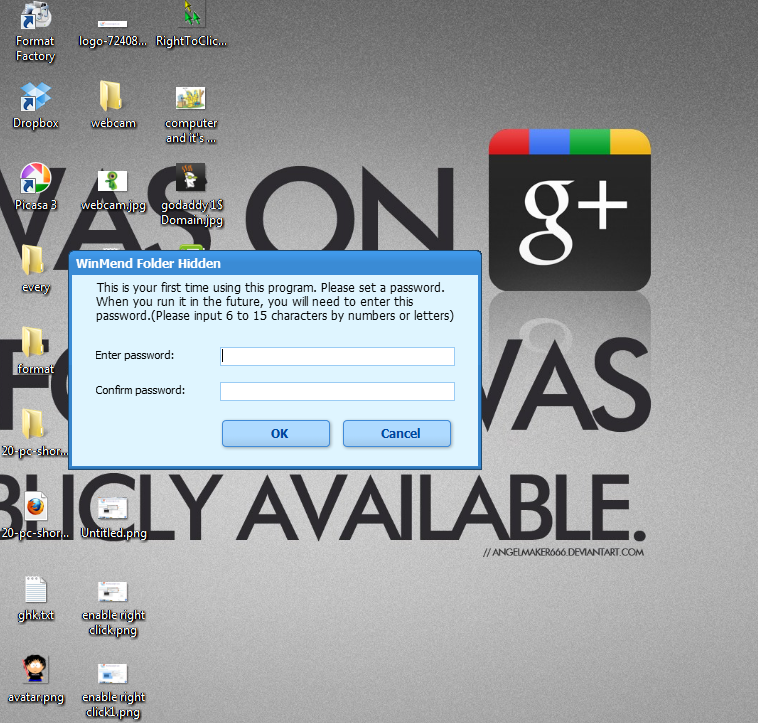
This is different that what you normally do to hide your files and folder in windows. I came up with a different software for hide files and folder in your computer called WinMend Folder hidden is free folder and file hiding tool. This utility ensures absolute system safety the application hide your files and folder in local computer and removable devices.when you install the application you will ask for new password after that you can use these software. This ensures your hidden files security from unwanted use of your files.

Steps to use WinMend Folder Hidden

1. Download WinMend Folder Hidden fro Here
2.Install in your system and run the application from your desktop Icon. Now you are prompted for enter password.


Share/Bookmark

January 31, 2012

How to enable Right Click On any Website.

Some time you visit to any website you like the content or you want to make project on it and want to copy the content as you right click you get a pop message Right click is disabled. This is because website owners want to make there website copy protected for that purpose the use simple Javascript to disable Right click on the website.

Steps

1. Download RightToClick Browser Addon for Firefox  and Install in your browser.

2.Now go to website which has disabled right  now right click on that website you will get a pop saying that Function Disabled with check box stop dialog pop from this website. check the box and press Ok button.


Share/Bookmark

January 26, 2012

Mcafee free one year trial.

Get free one year subscription of well know Antivirus Macfee with site advisory. Macfee Site advisory help you during browsing on the Internet McAfee SiteAdvisor Plus’ show safety rating  next to your search results

1.Simply Go to Following Link http://goo.gl/BZ1sM

2. Press Download Now Link after that you have to create a free account .

3. They will provide you Live installer i.e you require Internet during Installation.


Share/Bookmark

January 21, 2012

Top 4 Browser extensions for Bloggers.

Zemanta
Zemanta is a blogging dashboard designed for bloggers. It support all popular blogging platforms eg blogger, wordpress, Typepad, Tumblr,Movable Type, Drupal and Posterous. The main features are Add Affiliate Links ,beautiful images and insert link in your post to spice your post.

Download  Firefox  Chrome  Safari  IE


PageRank Status
Shows the google page Rank, alexa page rank, of your blog or any website you have opened in your browser. show the information about the website and ip and geo location of website.


Download Chrome Firefox Safari


Speed Tracer
Speed Tracer track your website loading time  if your website takes to much time to load traffic to your website reduces. Web page performance can impact its ranking in Google.
Download Chrome


 Whatfont?
what font finder is simple plugin to find the font used on any website and provide the name of the font and which company is produced that font and from which family. Font families can be disabled for test degradation for cross platform support.

Download  Firefox  Chrome


Share/Bookmark

January 16, 2012

Advance System Care 5.1with windows 8 support


IOBIT launched updated version of advance system care 5.1 with support for windows upcoming operating system for windows 8. Advance system care speed up your PC Performance and internet access protect you from malware adware spyware and from internet risks. This software is very easy to use and simple and boosts your pc performance.

In this version IOBIT introduced a new feature Real-time optimization with ActiveBoost function. ActiveBoost, technology that actively runs in the background intelligently managing system resources in real-time, constantly detecting inactive resources and optimizing CPU and RAM usage.


Share/Bookmark